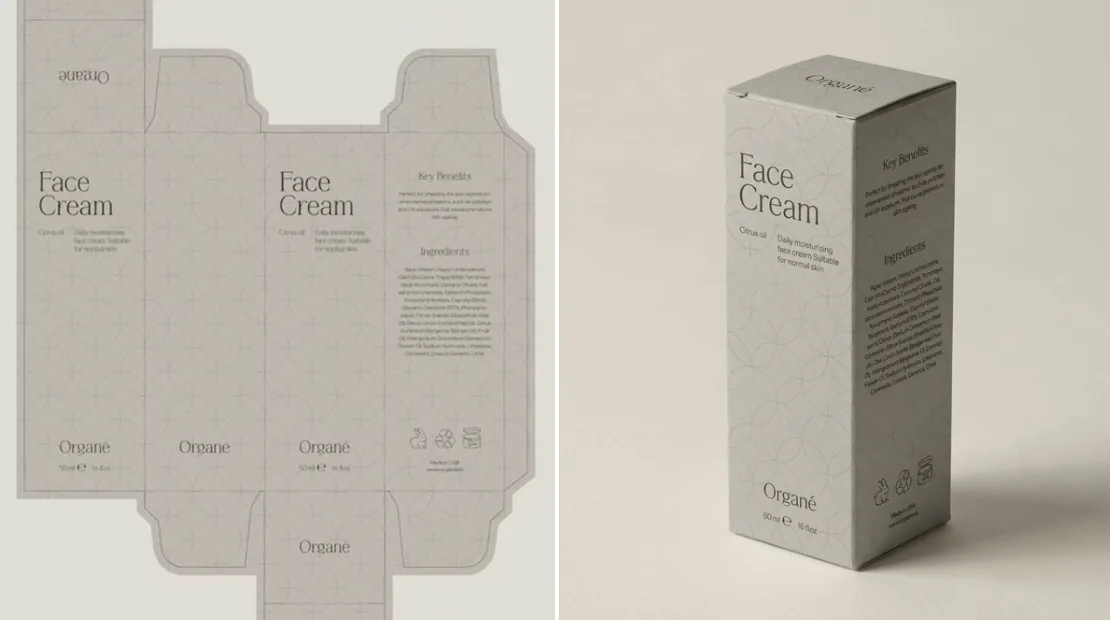
Dieline to 3D Packaging Box Mockup Prompt
Turn a flat packaging dieline into a photorealistic folded 3D box in a ¾ studio view, with artwork and typography preserved exactly.
This example image was created by @Salmaaboukarr with Nano Banana Pro (Gemini 3 Pro Image). The button below opens the GPT Image 2.5 generator on this site with the prompt filled in, so you can generate a similar image — results will differ from the example.
Opens the generator with this prompt filled in. Nothing is generated until you press Generate.
This prompt expects a reference image or your own content — upload a photo or paste your text in the generator first.
Full prompt
Assemble the dieline into a perfectly folded 3D box with accurate panel placement, clean edges, and undistorted typography. Preserve all artwork exactly as printed on the dieline. Render the box in a minimal, high-end studio setup on a soft neutral background with gentle diffused lighting, subtle shadows, and no extra props. Show the box upright in a refined ¾ angle. Ultra-realistic detail, true colors, matte paperboard texture, crisp folds, premium editorial aesthetic.Chinese translation
根据模切线将盒子完美折叠成一个立体盒子,确保面板位置精准、边缘清晰、文字无变形。所有图案均需与模切线上的印刷完全一致。在简约的高端摄影棚环境中,以柔和的中性背景、漫射光和微妙的阴影渲染盒子,无需任何额外道具。以精致的四分之三角度展示盒子竖立状态。呈现超逼真的细节、真实的色彩、哑光纸板质感、清晰的折痕,以及高端的编辑美感。How to use this prompt
Made for packaging designers and small brands who want a quick mockup before printing. Upload the flat dieline as the reference image, then run the prompt. The phrases doing the heavy lifting are “accurate panel placement”, “undistorted typography” and “preserve all artwork exactly as printed” — keep them. Change “refined ¾ angle” to “front view” or “top-down” for other shots, and swap “matte paperboard” for “glossy coated card” or “kraft paper” to match your stock. Always check small print and barcodes on the result before using it.